
Traktor DJ1.6.8 - App Store
You'll be able to see results in few seconds.
Publisher Description


The world’s #1 pro DJ software brings high-impact DJing to iPad. Touch your tracks and create stunning mixes in seconds.
"Incredibly well designed and packed with great features." (WIRED)
"It's wonderfully tactile and a lot of fun." (The Guardian)
"Traktor DJ brings real DJ tools to the masses." (The Verge)
"They worked on every little detail to get the app just right." (Loop Insight)
///ABOUT TRAKTOR DJ
- Revolutionary DJ app by Native Instruments – makers of the leading pro DJ software
- Touch the groove using familiar iOS swipe and pinch gestures
- Familiar DJ mixer layout with crossfader, 3-band EQ, and filter on each channel
- Direct access to your iTunes music library from TRAKTOR DJ
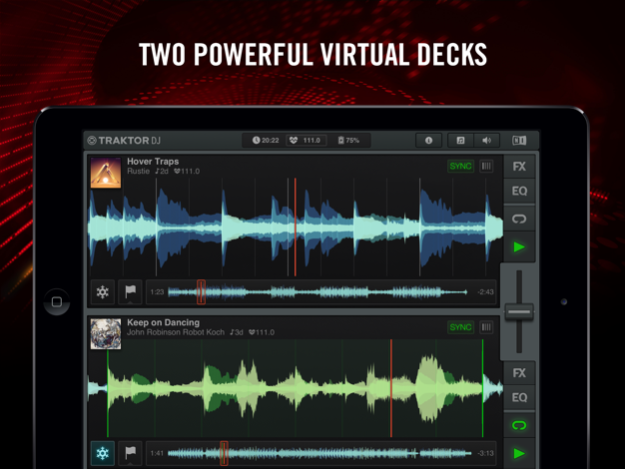
- Stylish waveform display allows for simple looping and ultra-tight scratching
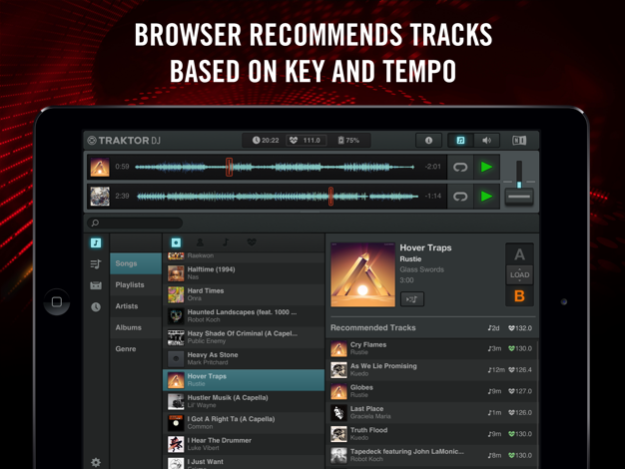
- Intelligent browser recommends songs based on compatible tempo and key
- Automatic tempo and key detection plus BPM sync for super-smooth mixing
- Notification Center gives you in-app access to tips and undiscovered techniques
- 8 built-in pro DJ effects including Reverb, Delay, and dramatic glitch effects like BeatMasher
- Audiobus integration allows two-way control of TRAKTOR DJ with other compatible apps
- Inter-app audio support allows TRAKTOR DJ to stream audio to other apps for further processing
- Plug-and-play integration with hardware controllers TRAKTOR KONTROL Z1, TRAKTOR KONTROL S2 and S4
- External mixer mode for sending individual deck outputs to separate mixer channels (if used with TRAKTOR hardware or splitter cable)
- Enhanced time-stretching, powered by élastique efficient V2 engine by zplane.development
- Flux mode – remix your tracks live, then drop back in at exactly the right moment
- Record your mixes live in high-quality on the iPad and share with your friends
Please note: The Metadata sync feature has been removed from TRAKTOR PRO 2. It’s still possible though, to sync metadata between two instances of TRAKTOR DJ.
///HARDWARE AND SYSTEM REQUIREMENTS
Minimum requirements are iPad mini, iPad 2, iPad (3rd generation) or higher, and iOS 7.0 or higher. iPad 4 recommended.
///VIDEOS AND MORE
Watch the TRAKTOR DJ intro video:
www.native-instruments.com/traktordjintro
Check out the TRAKTOR DJ Knowledge Base for support information:
www.native-instruments.com/traktordj-knowledgebase
///ELEVATE YOUR MIX
Want to get physical with TRAKTOR DJ? Check out the 2-channel mixer, controller, and soundcard TRAKTOR KONTROL Z1:
www.native-instruments.com/z1
Want total physical control for TRAKTOR DJ? Try TRAKTOR KONTROL S2 or S4. These pro-grade, all-in-one DJ systems combine with TRAKTOR DJ to unlock additional features like Beatjumps, chained effects, and Classic DJ mode with jog-wheel tempo bending (sync and keylock off).
www.native-instruments.com/s2
www.native-instruments.com/s4
Jun 27, 2017
Version 1.6.8
This app has been updated by Apple to display the Apple Watch app icon.
- Dropbox Sync has been replaced with iCloud Drive. Traktor DJ will use iCloud Drive to back-up the BeatGrids, HotCues, BPM and Key data of your tracks for safe-keeping. If you are using more than one iPad, iCloud Drive will keep the data in sync across your devices.
- We have addressed a bug that incorrectly displayed the number of tracks in your collection.
About Traktor DJ
The company that develops Traktor DJ is NATIVE INSTRUMENTS GmbH. The latest version released by its developer is 1.6.8.
To install Traktor DJ on your iOS device, just click the green Continue To App button above to start the installation process. The app is listed on our website since 2017-06-27 and was downloaded 0 times. We have already checked if the download link is safe, however for your own protection we recommend that you scan the downloaded app with your antivirus. Your antivirus may detect the Traktor DJ as malware if the download link is broken.
How to install Traktor DJ on your iOS device:
- Click on the Continue To App button on our website. This will redirect you to the App Store.
- Once the Traktor DJ is shown in the iTunes listing of your iOS device, you can start its download and installation. Tap on the GET button to the right of the app to start downloading it.
- If you are not logged-in the iOS appstore app, you'll be prompted for your your Apple ID and/or password.
- After Traktor DJ is downloaded, you'll see an INSTALL button to the right. Tap on it to start the actual installation of the iOS app.
- Once installation is finished you can tap on the OPEN button to start it. Its icon will also be added to your device home screen.
Program Details
System requirements
Download information
Pricing
Version History
version 1.6.8
posted on 2017-06-27
Jun 27, 2017
Version 1.6.8
This app has been updated by Apple to display the Apple Watch app icon.
- Dropbox Sync has been replaced with iCloud Drive. Traktor DJ will use iCloud Drive to back-up the BeatGrids, HotCues, BPM and Key data of your tracks for safe-keeping. If you are using more than one iPad, iCloud Drive will keep the data in sync across your devices.
- We have addressed a bug that incorrectly displayed the number of tracks in your collection.
version 1.6.2
posted on 2013-02-21
Disclaimer
Official App Store Link
We do not host Traktor DJ on our servers. We did not scan it for viruses, adware, spyware or other type of malware. This app is hosted by Apple and passed their terms and conditions to be listed there. We recommend caution when installing it.
The App Store link for Traktor DJ is provided to you by apps112.com without any warranties, representations or guarantees of any kind, so access it at your own risk.
If you have questions regarding this particular app contact the publisher directly. For questions about the functionalities of apps112.com contact us.
